Are you ready for the permanent, remote-friendly workplace? While many thought the pandemic brought only a temporary shift to remote work, the data tells a different story now:
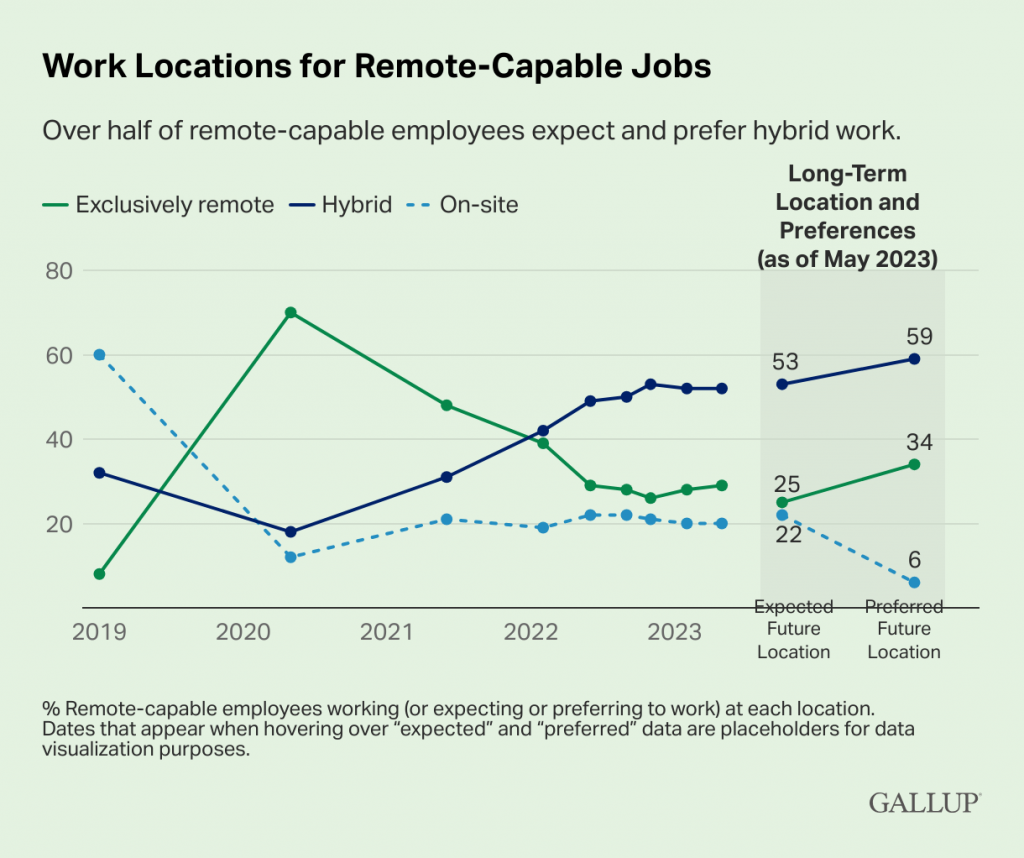
According to a Gallup, only two in 10 companies appear to be fully on-site and only 6% of remote-capable workers even want to be working fully on-site going forward.
The chart paints a stark picture that shows that we're heading for a hybrid workplace future; while the number of fully remote organizations has dropped rapidly from the May 2020 peak, rather than a similar rise and recovery of fully in office teams, we can see that hybrid organizations are now the majority.
These numbers starkly tell us that, despite some leader’s wishes, remote work isn’t going anywhere. That means we all need to be prepared and embrace the changes and challenges of remote teams.
Managing remote teams: A trend with no end in sight.
It's no surprise then that AngelList Founder Naval Ravikant said of remote work:
"It is probably going to be the single most important new category in hiring...We're going to see an era of everyone employing remote tech workers, and it's not too far away. In fact, now's the time to prepare for it.”
It’s even more amazing, because he said it in 2019, before COVID came along.
And that’s for good reason. A pre-pandemic study from Stanford found that companies that offered remote work options reduced job attrition by 50%.
Meanwhile, an MIT Sloan School of Management survey by Dr. Peter Hirst found that offering remote work options made employees happier, more engaged, and less likely to leave the company.
This alone would be a great trend to watch and expect to be a part of, but COVID came along and accelerated this even faster. We are already at only about 20% of employees being fully on-site.
With all this in mind, you're probably already managing a remote employee or two, and even if you aren't now, you likely will be in the next few years.
A warning to companies hiring remote workers: All that glitters is not gold...
Unfortunately, there's more to remote work than people not coming into the same office as you.
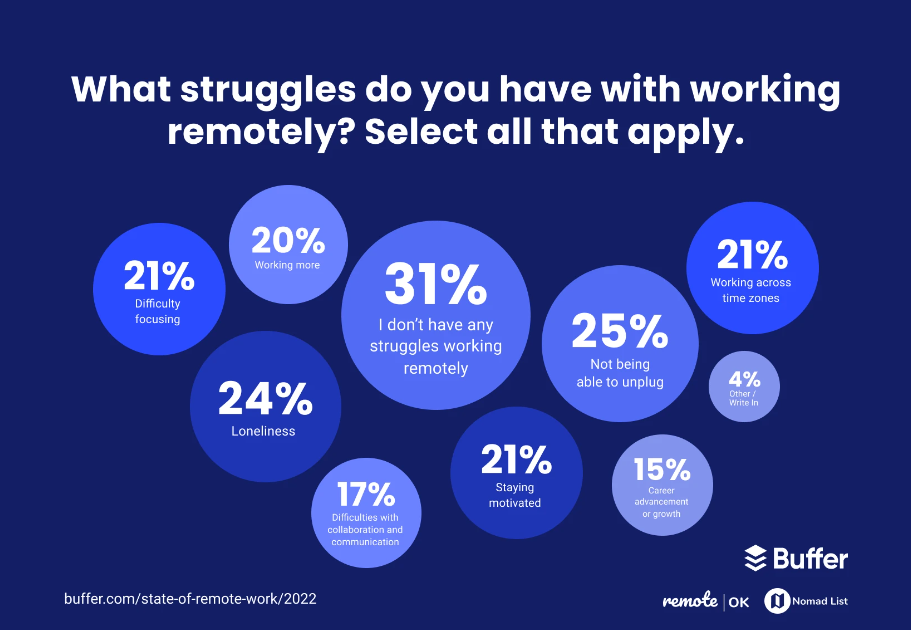
Hiring remote employees comes with unique challenges, both for managers leading those employees, and for the employees themselves. Buffer's annual State of Remote Report offers great insight into some of the challenges remote employees face. And you’ll notice these challenges are pretty consistent - remote work has consistent challenges with or without a pandemic.
Most managers aren't prepared for this, because they don't realize how different working remotely really is.
For example, the idea that most remote workers are digital nomads traveling around with their laptop, working on the beach, is totally false; as remote work evangelist and former CTO of Product Hunt, Andreas Klinger, remarked on Twitter:
Instead, most of the millions of remote workers work from home, a co-working space, or share a full-time office. They also don't travel more than the average employee.
So, are you ready to hire remote workers and manage them well?
If you plan on hiring remote employees, or you have already, this post is for you. Many of us fell into remote management with the pandemic, and you or your company decided to continue with a remote or hybrid setup by default.
On that path, it’s not long before you may start hiring remote staff, which has quite a few challenges you may not have planned for.
That’s why below we've broken down everything you need to know about hiring remote employees that you might not have seen coming, so you can avoid very costly mistakes and better manage those remote team members.
We'll cover a variety of common issues and pitfalls to avoid when hiring a remote team, and what to do about them, including:
Table of contents - Common challenges you need to be ready for
- Managing time zones for your remote employees
- Understanding intention from remote communication
- Empathizing with different cultural communication styles
- Making more time for your remote one on ones
- Whiteboarding and ideating without being in the same conference room
- Spending more time managing and documenting processes
- Planning and budgeting for regular face-to-face time with remote employees
- Praise and celebrations are harder, and often unequal, for remote team members
- Your remote employees may experience severe loneliness
- Unplanned, costly taxes, regulations, and other legal paperwork
- Not everyone is a fit for remote, even if they say they are
- All remote or none remote is much easier than some remote
- Onboarding is different, and even more important
- Unexpected surprises that only remote employees can pull off
- Additional resources/Further reading to continue your learning
So, let's jump in.
14 Challenges You didn't Plan for When You Started Hiring Remote Employees (and what to do about them)
The Lighthouse team is remote, and we've been speaking with various remote leaders over the past few years, collecting both public and private stories about the challenges specific to having remote employees.
Consider these guard rails to help you avoid making the same mistakes other leaders have made. Some will boost morale and productivity, while others can even save you thousands of dollars by avoiding unexpected taxes and fines!
1) Managing time zones for your remote employees
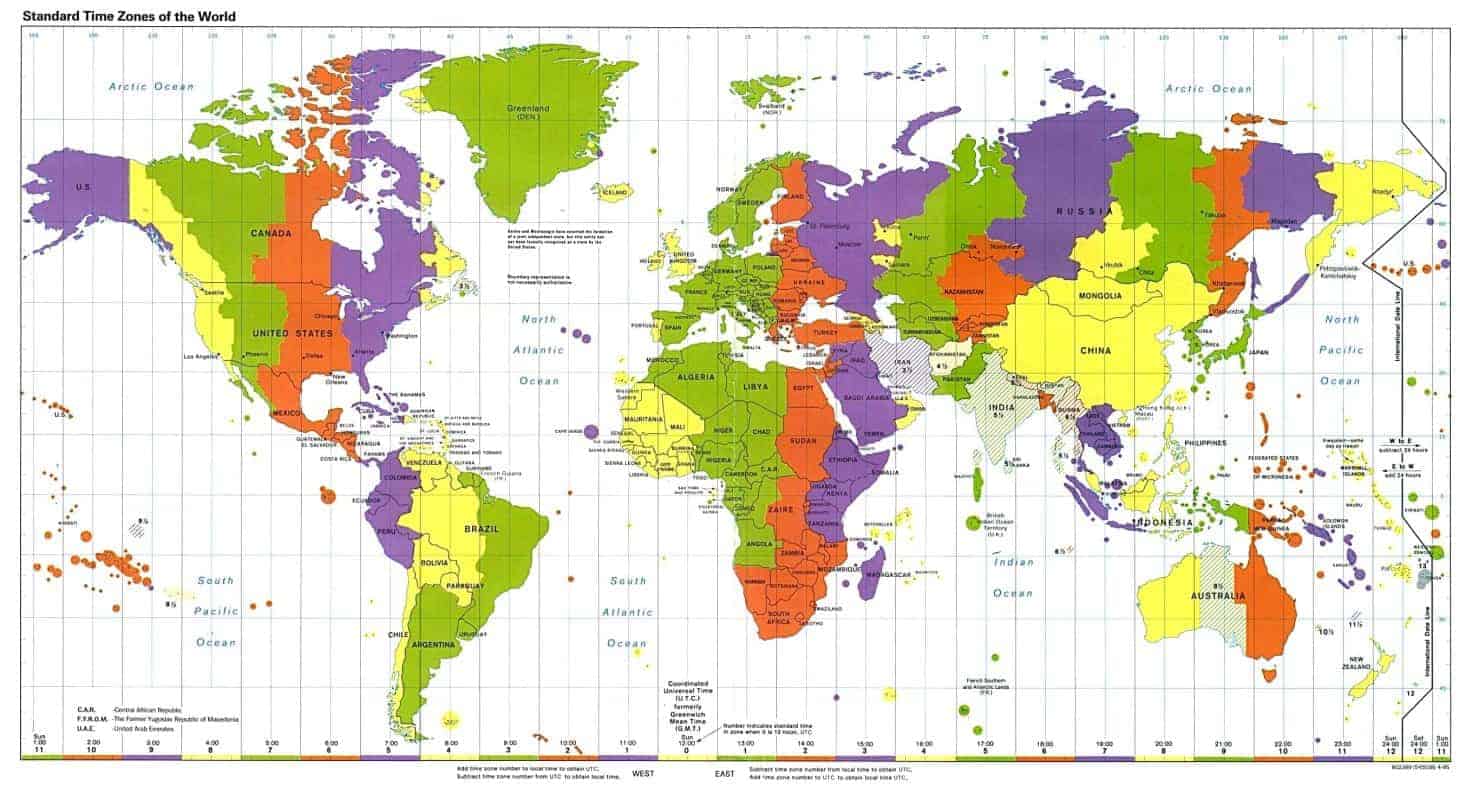
Dealing with different time zones is one of the first challenges you encounter when working with remote team members.
Small differences, like the 3 hours that separate California and New York, aren't often that big of a deal. However, crossing oceans changes that in a big way.
For example, the US West Coast (PDT) to Israel is a 10 hour time difference (and the latter don't work Fridays).
If you're in Silicon Valley and you're messaging a team member in Israel first thing in your morning, they're likely already out of the office for the day. And they won't be in yet by the end of your day, either.
With a schedule like that, at times you'll lose an entire day of work waiting for an answer or to have a conversation, simply due to time zone differences.
This might work out fine for most emails and some messages, but it makes it nearly impossible for scheduling group meetings. Less overlap in time zones also means when they need to talk to someone live, that person may not be available.
The tyranny of the main company time zone
These difficulties can create an uneven power dynamic for long distance remote staff. If a remote employee is many time zones away from most of your team, they can face a number of challenges:
- To make a generally accepted meeting time, they may have to get up very early, stay up very late, or miss things like typical family time.
- Remote workers may be excluded from meetings with excuses used like, "we needed to make a decision quickly" or "their window of meeting times is already full."
- They may completely shift the hours they work, causing them to sleep significantly differently than spouses, friends, and neighbors.
How to manage difficult time zones
To combat this, Doist founder Amir Salihefendić has several great tips for establishing a more asynchronous team culture, which he tweeted out:
5/ 🛑 Teach people how to spend time productivity while waiting for an answer. Blocks aren't a huge problem, as there is always something else to do.
— Amir Salihefendić (@amix3k) April 18, 2019
8/ 📄 Document things and make transparency a core value. For example, everyone in .@Doist can read all of the core discussions (regardless of which team it is, this includes leadership discussions). With transparency, people don't miss important conversations or decisions.
— Amir Salihefendić (@amix3k) April 18, 2019
In addition to those more fundamental changes to support asynchronous work, apps like Happy Tools, from our friends and Lighthouse customer, Automattic, help you easily schedule team meetings across time zones:
It's up to you whether the person you're hiring is worth dealing with these kinds of major time zone differences. However, it's good to know there are ways to make it easier to manage these differences.
As you dip your toe into hiring your first remote employees, it can help quite a bit if you focus only on candidates within a few times zones of your core team. By avoiding this time zone challenge at first, you can focus on perfecting some of the other challenges we cover in this post before expanding around the world.
2) Understanding intention from remote communication
According to the philosophical concept Hanlon's razor, coined by author Robert J. Hanlon, we should "assume ignorance before malice,” when communicating with others.
We can often give people the benefit of the doubt based on a variety of non-verbal cues and clues like a smile, the inflection of their voice, or their general posture.
We have eons of programming within us, way back from our early days of survival, designed to pick up on many of these non-verbal signs– signs you can't pick up on if you can't see someone face-to-face.
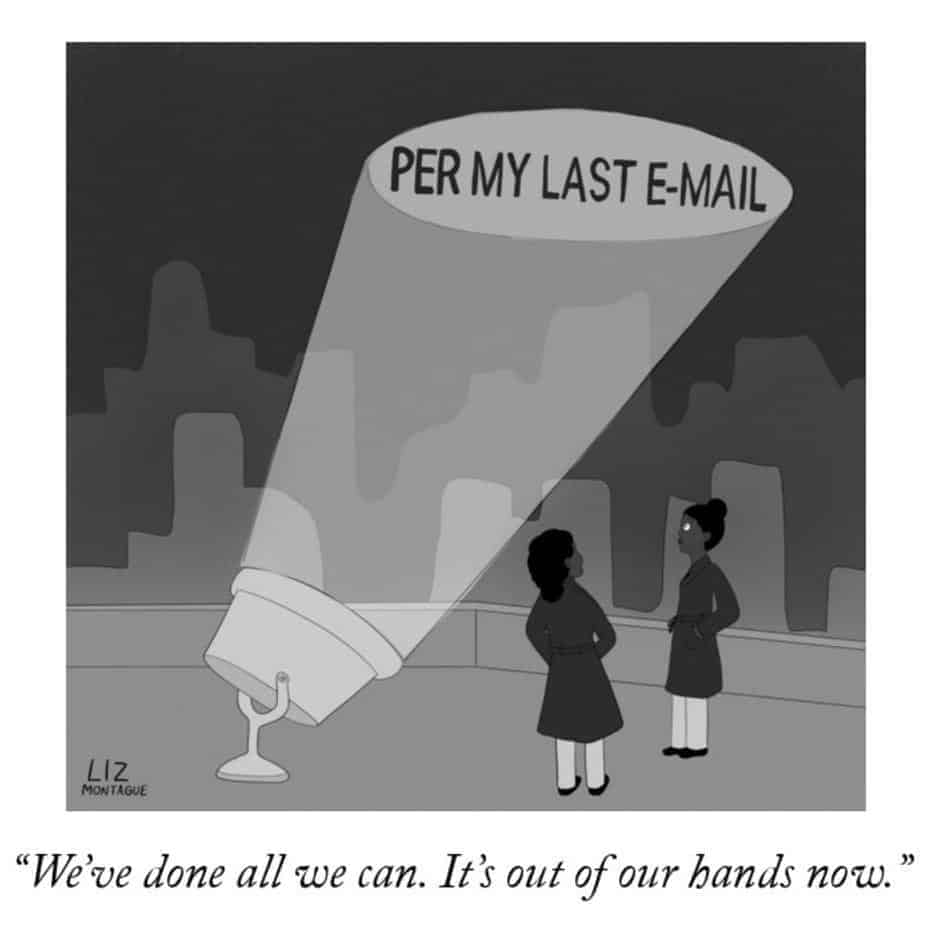
As a result, when we communicate online, through Slack, email, or comments in a project management tool, it's all too easy to assume the worst of our team members from a negative sounding message.
Our mind is executing an automatic defense program that never before had to draw conclusions with such limited information. When this happens, everyone on your team suffers.

Assume positive intent
Instead, make it a habit to assume positive intent especially when messaging with your remote employees:
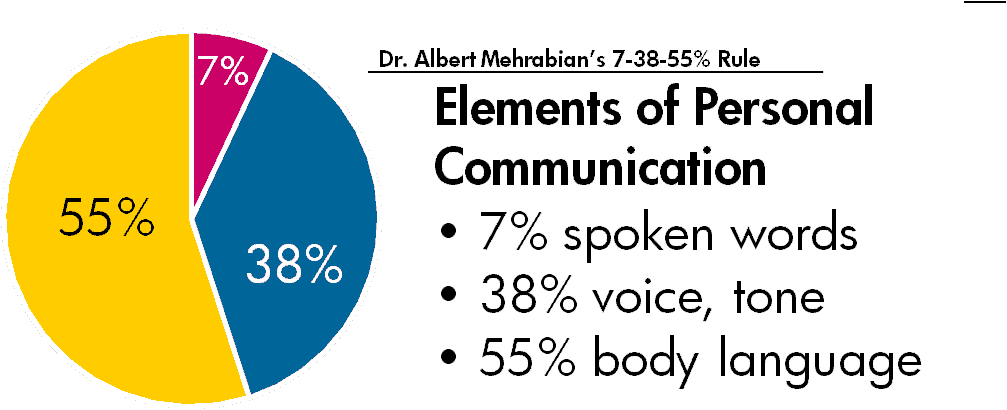
There's a lot of data to back all of this up. One study published in the Journal of Consulting Psychology discovered that 55 percent of communication is visual. That means when you're messaging remote team members online, you're missing out on 45 percent of what they're saying.
Another Cornell study echoed this, finding participants performed better when they could observe their instructor’s hands, eyes, gaze, and facial movements. Researchers from Cornell and University of Waterloo also found in a different study that in-person requests are 34 times more effective than email requests.
This adds up to an obvious, and important solution...
How to improve remote communication: Have regular video calls
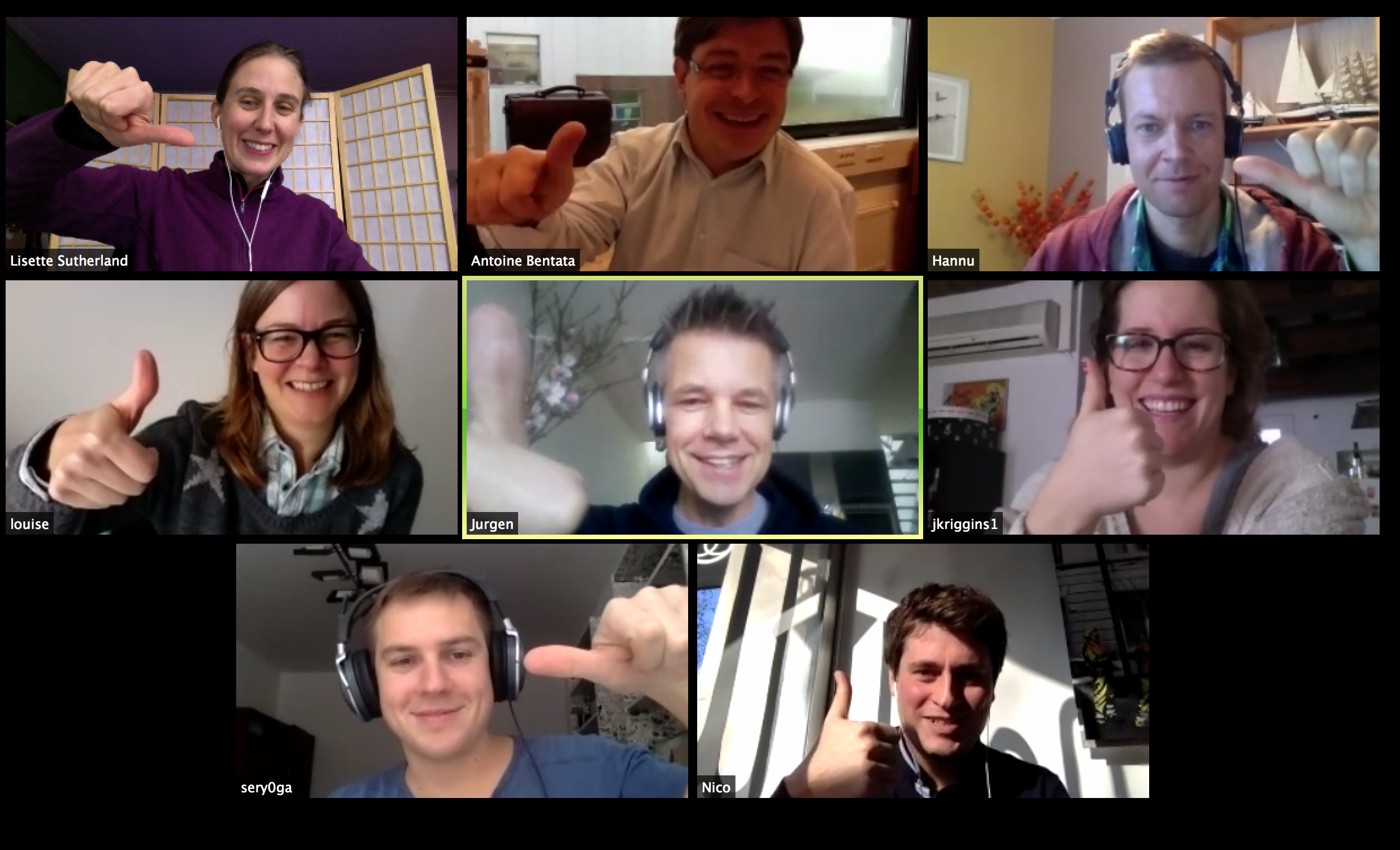
You can't and shouldn't stop messaging remote team members. However, one thing you can do to help this problem is to have regular video calls. Anyone managing remote employees for a long time will tell you that's remote management 101.
Tools like Zoom and Google Hangouts make this easier than ever. The ongoing improvement in video conferencing technology means that the frustrating bugs of recent years are thankfully becoming less and less common.
It's also reasonable to expect your remote employees to work somewhere they can have high bandwidth internet, so that connectivity is never a barrier to communication. You can test for this during the interview process, by seeing how easy it is to have quality video calls with them during the interview process.
Try to make everyone on one a video call, and when you need a lot of active participation in group meetings. Doing so will give you back much of the previously lost non-verbal communication: their voice, their tone, their body language.
It also creates opportunities to build more rapport with them and for everyone to get to know each other more, like when I saw a coworker wearing a Mark Price jersey and later surprised him with a related gift.
Like with most things, moderation is key. Don’t go overboard with meetings. To avoid Zoom fatigue, embrace things like asynchronous communication where it makes sense, and keep the meetings for times you need to decide or discuss something in real time.
Other ways to overcome or even prevent Zoom fatigue include avoiding multitasking, setting an agenda and sticking to it, only asking for video calls when necessary (i.e. for one on ones and group meetings that require a lot of participation) and allowing your team members to switch off their cameras on other calls.

3) Empathizing with different cultural communication styles
Beyond understanding a coworker's intent, sometimes communication barriers can occur when your remote employee is from a different culture. What one person thinks is normal and acceptable can feel odd, offensive, or foreign to another person.
Even within the U.S., there are different styles. For example, New Yorkers are known for being more brash and direct, while SoCal folks are often more indirect and laid back.
Can you tell when someone is being a jerk, or they're just being direct (sometimes they're the same thing)? There's a lot of nuance to understand if you haven't lived everywhere your remote employees have.
This video captures a slightly funny and extreme case of this, with a German and New Zealand couple discussing the different ways to discuss changing a dirty kitchen towel:
The point is that you may not even know when you're offending, or not getting through to someone, and the same is true for your remote employees.
The only way to know is to take the time to get to know your remote employees well, and to make sure there's a clear, open dialogue with them. You need to ask good questions from the start like Lara Hogan recommends on feedback:
- How do you like feedback? - the medium (IRC, email, in person, etc.)
- How do you like feedback? - routine like in 1:1s, or as-it-happens
- How do you prefer to receive recognition? (public or private)
Learning these things will help you start on a stronger foundation with them. Then, over time you can learn more about their culture, and share some of yours so that you both can better understand each other.
Culture and habits impact everything
Realize however, this goes beyond coaching and feedback. This can impact everything from how that remote team member asks for a promotion, brings up issues, and interacts with the rest of the team.
It's important to take some time to understand their cultural communication style and explain yours to them. That way, you're not unfairly comparing them up against your own cultural norms, and you can work together to bridge any divides or misunderstandings.
In the end, the responsibility is shared by you and everyone on your team to understand each other.
As you bring in more and more cultures around the world, lead by example and explicitly talk about how there may be times people will misunderstand each other.
By doing so, you'll help everyone give each other the benefit of the doubt, and avoid little things like tea towels becoming a bigger deal than they should be.

4) Making more time for your remote one on ones
Your remote team members can't stop by your office nor easily grab you in the middle of the day to ask a question or offer feedback on a project. They also can't attend the office happy hour to build rapport with you.
Plus, as we talked about earlier, it's easy to misunderstand intent when communicating online.
The best way to offset all three of these issues effectively is to invest more time in one on ones with your remote team members.

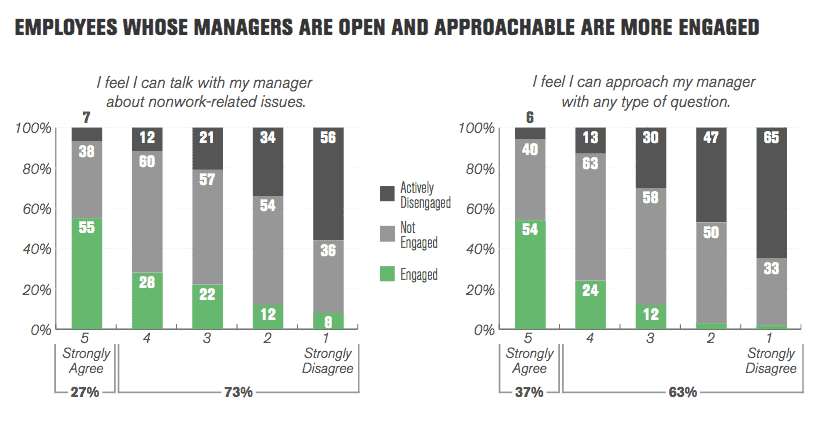
Longer one on ones help you have time to build rapport with your remote employees. That rapport goes a long way towards helping offset the challenges we've already covered today. Rapport makes communication healthier, obtaining and giving feedback easier, and it can even improve engagement.
According to Gallup's State of the American Manager report, employees whose managers take the time to build rapport are more engaged:
However, the only way to build that rapport with your remote employees, is to invest time to create it. When you're on a call, it can be really easy to stay formal and efficient, staying on task.
Resist that temptation and make some small talk. Ask how their family is, be curious about their holidays, and take an interest in getting to know them.
This all starts with your schedule. Set aside an hour for your 1 on 1s with them every week, and let there be some small talk in other meetings.
It may not seem like in the short term it has a strong ROI, but the foundation is priceless. It also makes work more fun and interesting as you get to know what makes different people tick.
One on ones are one of the best tools for any manager, and especially remote managers. They're also one of Valentina Thörner's favorite tools as we discussed a wide range of remote and hybrid team management tactics in our great interview with her on our podcast:

5) Whiteboarding and ideating without being in the same conference room
Sharing ideas between remote team members is naturally more difficult. That's mostly because you're missing that critical office element of a common space.
Remote employees have nowhere they can go to riff on an idea that just popped into their head. Similarly, remote employees miss all those unscheduled conversations (aka - "Collisions" as Steve Jobs called them) about tweaks to product, great ideas, or last-minute project changes.
If you have remote employees on your team, that central place where you can go must become digital. This also makes whiteboarding and ideating/brainstorming in general much more difficult.
Tools for whiteboarding and brainstorming with remote employees/teams
Often, remote teams will fly in to meet each other specifically for whiteboarding and deep, creative, project collaboration. This can make the whole process a huge pain, and lead to key discussions getting put off longer than they should.
Fortunately. there are a lot of tools that help make this process easier.
Head of Remote at AngelList, Andreas Klinger, asked his following what they use to whiteboard and brainstorm with their team remotely. These are some of the most commonly tweeted tools:
How do you do retros and idea brainstorming efficiently online?
Are there good online whiteboard tools you can recommend?
Are there better ways to do this?— Andreas Klinger 🏝 (@andreasklinger) May 13, 2019
Mural for general brainstorming:
We've used https://t.co/JHsHZWcgR1 for brainstorming and FunRetro for retrospectives.
Mural also has templates for retros, but I haven't used them.— :snowflakelbz: (@dossiette) May 13, 2019
Miro for whiteboarding:
Upwork runs on @MiroHQ (previously called Realtime board) all the way for anything related to whiteboard.
For many engineering meetings, we use Google docs + Hangouts.— Utkarsh Sengar (@utsengar) May 13, 2019
Parabol for retrospectives:
And some prefer to get creative, like this sailboat whiteboard:
Many also suggested Google docs instead of a whiteboard or brainstorming-specific tool because of the ease of functionality.
Ultimately, the best tool to use is the one you and your team like. Trying a few different ones can be tedious at first, but finding one that you all like can make a huge difference in the frequency and quality of your whiteboarding / ideating sessions.
This then improves the quality of the work you and your team delivers, and can improve the rate of innovation, as you remove a key bottleneck in your process (ie- waiting to fly someone in).
6) Spending more time managing and documenting processes
Setting up and managing processes within remote teams takes more work– and that includes partly remote teams, not just those fully remote.
Quick conversations in the office add up fast. Not only do questions get answered faster that way, but numerous company culture norms also get communicated by both what is spoken, and what people see others doing. Unfortunately, remote employees only see a small fraction of those things, so you need to compensate for that.
This extends to a variety of situations. If an unplanned conversation happens only with those in your office, your remote employees are both not involved in the discussion, and unaware of its outcome. They lose twice, and are now left feeling out of the loop.
To combat this, set up clear processes upfront that guide team members without slowing them down.
How to set up more intentional processes to support remote team members
In his "remote teams crash course”, Andreas Klinger writes:
"In remote teams, you need to set up in a way people can work as autonomously as they need. Autonomously doesn't mean "left alone” it means "be able to run alone” (when needed).
Think of people as "fast decision maker units” and team communication as "slow input/output”. Both are needed to function efficiently, but you want to avoid the slow part when it's not essential.”
He suggests asking several important questions to set up these autonomy-supporting processes by asking yourself:
"How can you…
… define strategy clear enough that people can formulate their own decisions without going off-track?
… set goals clear enough that people can benchmark themselves or their decisions?
… setup decisions hierarchies in a way that only non-reverse-able important decisions even bubble up to you?
… create confidence? (speed comes through confidence)
… set up your environment/processes that they can act even in emergencies on their own?
And also ask yourself...
- When is it enough that you hear about it and when do you need to be involved?
- How can you make sure that you are only involved in every 10th decision and only "manager-override” every 100th?
Similarly, DevOps platform Gitlab's remote work manifesto outlines several specific points to improve team processes. It states that, "All-remote work promotes:
- Writing down and recording knowledge over verbal explanations.
- Written down processes over on-the-job training.
- Public sharing of information over need-to-know access.
- Opening up every document for editing by anyone over top-down control of documents.
- Asynchronous communication over synchronous communication… ”
Each of these principles helps establish processes that are more conducive to remote work and ensure that remote team members never miss out on important information.
It's really about information dissemination
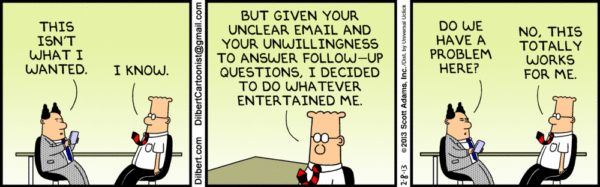
The biggest problem with partly remote teams or hybrid teams is the difficulty with making sure that information gets to everyone on the team promptly and effectively.
If you're used to having everyone in the office, it can seem jarring to have to deal with keeping a remote team member in the loop. And that's in addition to making sure they have what they need to get their work done mostly asynchronously.
Documentation of everything is the key habit that needs to be adopted by everyone on your team. It's easy to forget that your remote team members weren't a part of that last-minute conversation as everyone was walking out of the office last week.
One way to remedy this is to write everything down and keep it in a central place. The GitLab handbook and Basecamp Handbook are great examples of ways that many remote-first companies are doing this.
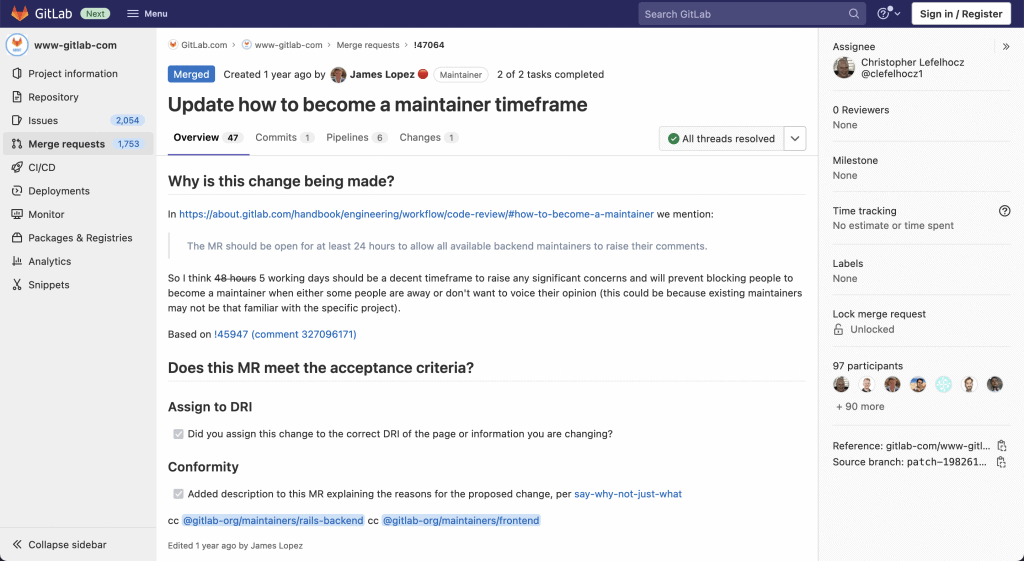
These types of handbooks serve as a first point of contact for any issues and help to keep remote employees up to speed in a systematic way. They can be edited quickly and easily by anyone using platforms like GitHub and GitLab and can be managed on multiple branches and with multiple collaborators.
By building processes like this that make sure everything is documented in a systematic way, you ensure your remote team members (and really, everyone no matter where they are) are easily kept in the loop.
They also then have places to contribute as they can review any newly documented items and add their thoughts, feedback, and suggestions, just like they would have had they been in the original meeting.
Don't feel like you have to be perfect. Any documentation is better than none for someone who otherwise would have nothing to look at.
Once you have some documentation, you can start to iterate to the format (video, audio, docs, etc) and information that fits your team and each situation best.

7) Planning and budgeting for regular face-to-face time with remote employees
The idea of hiring remote employees can be seductive: managing an employee whom you simply check in with periodically, gets their work done on their own, and generally saves you on salaries by being able to hire outside costly areas like Silicon Valley.
The problem is, nothing beats the magic of face-to-face interaction for both creative work and bonding. Just because one of your employees is remote doesn't mean you never have to meet in person.
Ideally, you should be flying remote employees in regularly, as much as every quarter depending on need and preference. So, while you may be saving on salaries, you should be using some of that savings on flying people out to meet with the rest of the team.
Consider company retreats for remote team bonding
Company retreats can be pricey, but they can offer a great return on investment. As Zapier co-founder Wade Foster (a fully remote company) explained:
"It's hard to have an impromptu, deep conversation with a teammate over Google Hangout about their kids, some random idea you've had improving a secondary process in the company, or company values. All those things tend to naturally happen in person, while they don't happen in a remote team unless you force it.”
When I was the product manager at KISSmetrics, we had annual summits, too. They were always both extremely productive and energizing. It was fun to meet people we had only known over video, and the combination of deep collaborative work and bonding events created positive momentum for months afterwards.
Carolyn Kopprasch, Chief of Staff at Buffer, recounted some key activities at one of Buffer's (another fully remote organization) annual retreats: 10 Reflections on Buffer’s 10th Team Retreat
Watch out for retreat missteps
Keep in mind that retreats can be challenging for those with families, who may have difficulty with the logistics of finding extended childcare, among other challenges. Consider both your team's composition and various people's needs when choosing the length and location of your retreat.
Also, keep in mind that the activities you choose during the retreat say a lot about your culture and can either make people feel much more welcome or really uncomfortable. A few examples of faux pas that I've heard others be frustrated by:
- Going to the beach may sound like fun, but there can be a lot of uncertainty on what attire is appropriate (especially for women) and what people are comfortable with in an environment where more skin is shown.
- Your early team may have been a bunch of bros who love smoking weed, gambling, and skiing, but can alienate your staff as it becomes more diverse and not everyone wants to do those things.
- Making lots of drinking part of every day of the retreat can be hard on people who prefer not to drink, or may be a recovering alcoholic and not want to have to tell the entire team about it.
As with many of these unexpected challenges with having remote employees, communication is at the center of solving these problems. Running ideas for retreats by your team can help ensure you pick activities most will enjoy, and avoid issues that would alienate some team members.
Thinking about having your first retreat? Check out this post from Buffer: Planning A Company Retreat: Things We Did Differently for Buffer's 9th Retreat in Singapore

8) Praise and celebrations are harder, and often unequal, for remote team members
It's easy to go out for drinks or have a quick high-five in the office. Some companies even ring a bell or strike a gong for big wins or deals closed. With remote team members, simple acts of praise and celebration are more difficult, as they miss out on these things.
One on ones are always a great place to offer praise and congratulate them privately, but group events are virtually impossible to organize the same way you can for a local team member.
The last thing you want is for one of your remote team members to feel disconnected and that they aren't appreciated the same way other team members are. Fortunately, there are some things you can do to improve this.
How to offer praise and celebration to remote team members
Just because you can't give someone a real high five doesn't mean you can't spark some emotion. Your best friend is the gif:

With Slack having the Giphy integration and Microsoft Teams having gifs built in, it's never been easier to turn "Good job" into a quick clip that makes everyone smile. Get creative and have fun with it.
Meanwhile, with a little creativity, you can make sure your remote employees also feel part of team drinks and dinner.
As a friend recently shared with me:
"At my last role, when the office went out for drinks to celebrate…every other satellite office/remote person was given a celebratory budget and practically forced to go out/stop working at the same time.”
Similarly, you can try something like pizzatime.xyz to create that same feeling:

As described on their site:
"Have you ever wanted to host a party across a bunch of wildly different time zones and locations? No? Well we have and now you can!
Host a pizza party for your team, no matter where they are; you tell us when and we'll take care of the rest.”
All of this really comes down to thoughtfulness. While certain habits are different than you do for in person staff, with a little effort you can replace them with something that makes them feel appreciated and included, too.

9) Severe loneliness can strike your remote team members
Feeling like you're out of the loop, and under appreciated are not the only challenges that remote workers face.
Product Hunt co-founder Ryan Hoover asked his Twitter following what their biggest frustration was with working remote:
The most common answers were everything from the difficulty disconnecting at the end of the day:
To distractions such as from their kids:
And, well… other distractions:
Though the most common challenge mentioned by far was the isolation that remote workers experience and the loneliness that grows from it:
Working remotely might sound like paradise: the ability to work whenever you want, the freedom to take a break when you need it, live where you personally prefer, and always dress comfortably.
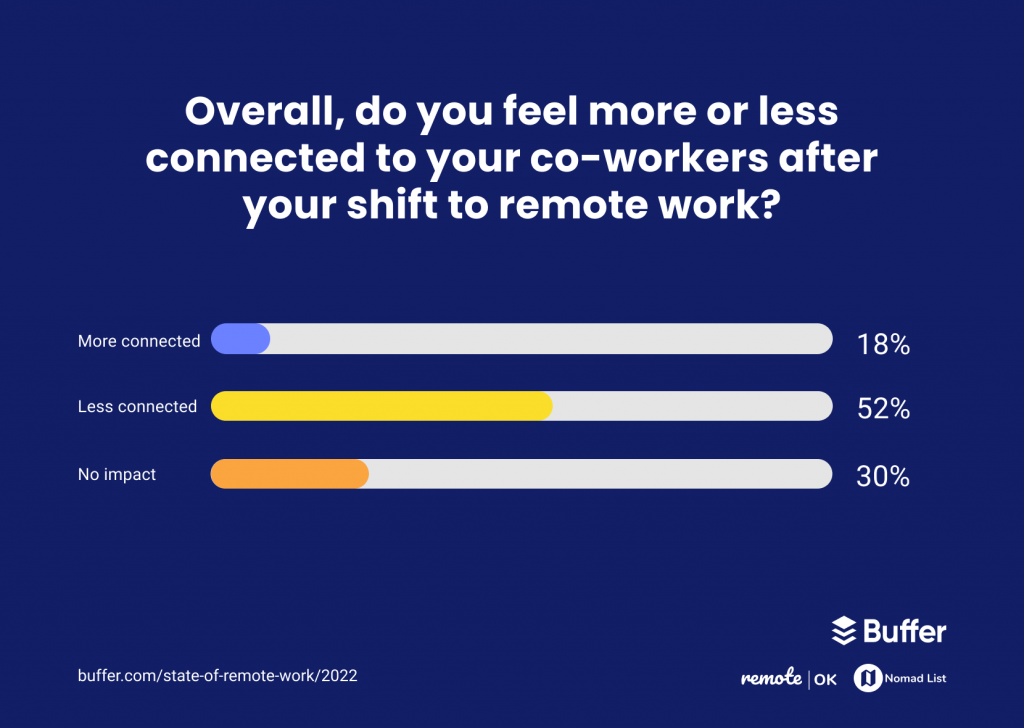
Those are nice perks, but the freedom you get working remotely comes with a major potential drawback: isolation. This is likely why it keeps coming up in the Buffer State of Remote Reports every single year, including in 2022:
The vagus nerve and the need for regular human connection
A lack of regular, deep human connection for long periods of time is one of the most unhealthy things we can experience. And that need for real human connection goes right down to our biology.
Buffer co-founder Leo Widrich wrote about neuroscientist Stephen Porges' discovery of the vagus nerve; it's a nerve so powerful it influences our entire nervous system, the brain, and most of our general well-being.

According to Porges' research, the vagus nerve split into two different nerves some time ago: a nerve we share with our reptilian ancestors from 500+ million years ago, and a new version which we inherited from our more recent (200-300 million years) mammal ancestors.
That newer version of the vagus nerve is connected throughout the body and reacts when we interact with another person. That interaction activates what's sometimes referred to as our "social engagement system.” Each time that system is activated, it's worked and exercised like a muscle, so the more we use it the stronger it becomes.
When you work in an office, you connect with your team members through your many conversations, everyone's ups and downs, the shared wins and losses, etc. Each of these interactions lights that system up and flexes it, keeping it healthy and in shape.
How loneliness is born (and why it matters)
The challenge for remote employees is that they don't typically get enough opportunities to exercise their vagus nerve. As a result, it gets out of shape and can even atrophy like any muscle in the body.
This very thing was found in mice as revealed in a Neuroscience 2018 report, where researchers removed the mice from their social structure and placed them into isolation, later witnessing their brain cells connected with social interaction atrophy.
Loneliness might then be a warning sign the brain sends off, attempting to get you to socially exercise. That's important because research has shown that prolonged isolation can result in all kinds of things like depression and anxiety. (To help you or a team member, you can read more in our post: 4 Tips on How to Deal With Anxiety at Work in the Long-Term)
How you can help prevent loneliness
As a manager, you need to be aware of the effects of isolation on remote team members. It's not all up to you, but there are things you can do to encourage those working under you remotely to engage socially with the team.
First and foremost, you should talk about where your remote employees plan to work. Andreas Klinger tackles this in his remote crash course by saying in clear terms that he believes remote workers should not work from home. He feels that it heightens the isolation factor.
Instead, he says encouraging remote workers to get shared office space (not co-working, which he says can be too distracting) has helped with teams he's worked with.
Meanwhile, leadership coach and former CTO, Mathias Meyer, asked his following on Twitter what they do to stay socially healthy while working remotely and offered a few of his own tips which can apply to any remote situation:
Mathias's followers shared a variety of great tactics you can recommend your remote staff work into their routines:
- Meditate to clear their mind and relax
- Work in a place with busy traffic and activity near you
- Exercise outside your home regularly and potentially in a group like a sport or yoga
- Cowork with friends at their office, a coffee shop, or coworking space
- Take a walk around your neighborhood
- Volunteer regularly in your community
- Be intentional and comfortable making small talk with coworkers (it doesn't have to be hard work the entire time)
In general, the best way to beat loneliness is to get out and interact with friends and family more often.
Of course, that’s easier said than done and people often don’t even want to bring these feelings up. That’s why you, as their leader, should.
You can bring it up in your 1 on 1s, and offer suggestions for socializing. Additionally, you can set a good example by making time for small talk in meetings. This will not only benefit your team’s productivity and their relationships with each other, but also save that vagus nerve from atrophy.
10) Taxes, regulations, and other legal paperwork
Do your current or prospective remote employees work in the same state? The same country even? If you're typically hiring remote employees in California, then you hire someone from Florida, do you know what kind of tax and other logistical paperwork you'll need to take care of?
If not, it could bite you hard as Baremetrics founder Josh Pigford found out:
Hiring people in different countries will have many different rules, and because of that many founders and managers are more on top of that. However, just as important can often be hiring across state lines.
Each state may have different rules and regulations to follow in addition to taxes to file. You also have to pay for things like unemployment insurance, and worker's compensation, separately for each state.
The hidden costs of hiring remote employees
What was otherwise a few quick entries in your payroll system can quickly get a lot more complicated and time-consuming, whether you're hiring remote employees in other states or countries.
Most important is to remember that government rules and regulations are serious; you can't explain issues away, nor "ask for forgiveness instead of permission" when it comes to these things. You will get caught, and you will get fines.
Therefore, while it's exciting to add new hires from a new place, you'll want to make sure you put in the proper time and consult the correct help in staying compliant in each country and state to cover your bases and budget for any added costs.
The best way to stay in front of this is to do the following:
- Before hiring someone in a new state or country, talk with HR and legal to make sure there aren't any special considerations to keep in mind.
- Contact your payroll provider to see what they can automate for you and what they recommend. Even for things they can't do themselves, they often can point you to the right government website.
- Ask your potential new remote employee, as they may have gone through all of the same hoops in a previous job.
Being a manager is not always glamorous. This is an example of unsexy, yet necessary work, to ensure that your next remote hire comes on board smoothly, and your company avoids any unexpected fines or violations.
11) Not everyone is a fit for remote, even if they say they are
Earlier, we talked about some of the most common challenges for remote workers. One of the most often mentioned was having the discipline to turn off:
Discipline plays a role on the flip side as well: you need to be disciplined enough to sit down each morning and get your work done without any (or very little) outside encouragement. Remote workers have a ton of freedom, but an equal amount of responsibility comes with that as well.
Not everyone has the discipline or habits to do this. Many people benefit quite a bit from having a commute to work, sitting at a desk around their peers, and then leaving when everyone else does.
There's nothing wrong with needing that environmental structure, but that means that person may not be a great remote employee, even if they thought they could handle it.
How to find out if someone is productive working remotely
As a manager, it's difficult to know if someone is a fit for remote work before hiring them.
However, once hired, you need to balance trusting them, and having them fail to deliver for too long. As we've discussed before on the blog, you can use the concept of Task Relevant Maturity with them:
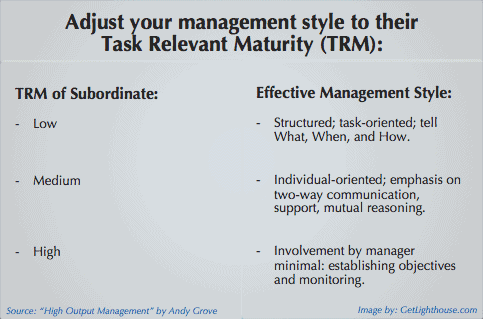
Start out checking in more often, and give them smaller projects that you know can be delivered quickly. As they hit milestones and build momentum, they'll have more confidence, and so will you.
You can then back off and be confident they can handle remote work, or be more hands on to help them build the right remote habits or move on from the job.
Experience = The only effective test of self-discipline
The best way to ensure someone can do remote work well at your company is to hire someone who has done it before. Then, they can speak specifically to how they have made it work in the past during the interview process.
Fortunately, with the rise of not just full time remote work, but many companies embracing work from home days, many more people are getting experience working remotely than you may expect.
This suggests employees need more experience in their profession before they're ready to effectively work remote. If a potential hire doesn't yet have much experience in their field, no matter how talented, they're not as likely to have the discipline nor experience necessary to work remotely.
This also makes sense when you think about the challenges of mentorship and coaching. While there are tools emerging trying to make things like pair programming easier remotely, it's much easier to coach someone in person as it stands today.
In our conversations with managers, it's clear you have to be a lot more intentional about mentorship with remote team members.
There's a big difference between being able to look and call over a junior team member to see something in the office versus remembering to proactively ping them and add them to a call in the moment (if they're even available at that time due to work schedules, time zones, etc).
To avoid running into issues of people failing to have the discipline to work remotely, consider focusing your remote work hires on the roles requiring more experience.
And when that's not an option, be prepared to monitor new remote employees a bit more closely as they start to ensure they're starting off on the right foot with your team.

12) All remote or none remote is much easier than some remote
There's a big difference between fully distributed teams and teams that have a few remote employees.
With fully distributed teams, remote is the norm. There is no feeling left out of celebrations, no being looked over for promotions or new responsibilities, and everyone understands what it's like working remote.
However, with a mixed team, or one where you have only a few remote employees, the situation changes entirely.
With mixed teams where most, or a majority, of the team works on-location, remote team members often miss out. They miss last-minute meetings, end-of-the-week happy hours, and all kinds of other critical interactions you only get in the office.
Team members also may not have learned the habits and instincts to think of colleagues they don't see in the office daily. Being left out and out of the loop becomes the norm for remote employees especially in these cases.
The challenges of managing partially remote teams
We've already touched on some of the things remote employees miss out on, but it's important to know that many of those challenges also apply even more to partially remote teams.
Fully remote teams often are much better at addressing the aforementioned challenges, because they have to; nothing would get done otherwise, and they think in terms of remote first.
As you look to hire remote workers at your company or commit all the way to a fully remote organization, it's important to do so with open eyes. This is for your sake and for those potential hires.
Especially consider the many implications and changes that need to occur to support hiring your first remote employee if the rest of the team is on-location.
There are a lot of nuances to this topic, and there is no cookie-cutter answer we can give as to whether hiring remote employees is a good or bad idea for you.
Fortunately, Andreas Klinger (AngelList), Jeff Morris (former Director of Product at Tinder), Arianna Simpson (Managing Director at ASP), and Preethi Kasireddy (CEO at TruStory) had a great discussion about remote work worth watching on this topic: LIVE DEBATE: Remote work is the future.
Plot Twist! Your first remote employee might not be a new hire
After COVID, some of us returned to the office, but many did not. Some people moved during the pandemic, which means they couldn't come back to the office.
Put in a bind, many companies let those people stay remote, or you may have even advocated to save one of your employees who moved. Either way, suddenly you have a hybrid team.
Whether a team member proposes working fully remote or partially remote, it sets the stage for you to hire your first remote employee and have other employees ask for the "perk" because it opens up the idea to other members of the team.
By trying out remote work this way it's also a bit safer for your company.
You already know the employee you're hiring and the caliber of work they do. You can easily monitor how their output changes after they start working remotely, to see if it gets better, worse, or stays the same.
This can build more confidence in allowing for more remote work across the company and even hiring new people who will always be remote.

13) Onboarding is different, and even more important
Onboarding a new hire well is critical. Not only for their long-term success, but also for you and your company's bottom line.
Consider this: According to a study by Automatic Data Processing, Inc., only 21% of 1,500 employees surveyed were satisfied with their employer's onboarding process.
And this: According to a study by the Society for Human Resource Management (SHRM), it costs the average company 6-9 months worth of an employee's salary to identify and onboard a replacement.
Put it all together and what do you have? Bad onboarding is going to cost you, big time, and in more than one way.
This is hard when you're all in the office together, and onboarding new remote team members adds another layer of difficulty; you will have to integrate them into your team, make them feel welcomed, and get them up to speed and productive all through a computer and video.
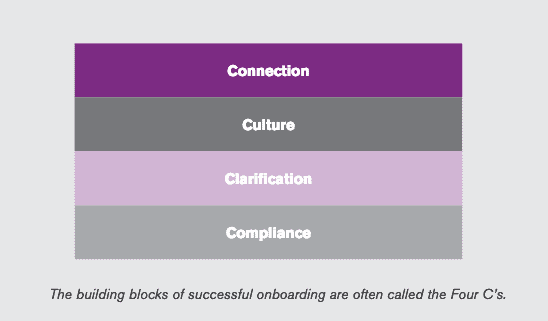
Tips for welcoming new remote hires
So many things about onboarding are simpler and more natural in-person: they get to see your office, observe teams working together, get a "feel” for the culture and the flow of your workplace in general, and build instant connections with those they meet face-to-face.
These are all things we take for granted when working in an office that remote hires can't pick up on or get remotely.
And then there's the issue of letting the rest of the team know when new hires are brought on. Obviously, you can't see them walking the halls of your office if they're not in the office.
Parker Agee, a Senior Software Engineer, asked the Twittersphere how large remote teams handle this:
Patrick McKenzie (@Patio11) responded with a few of the hiring announcement-related processes they use when onboarding new remote hires at Stripe:
As you can see, none of these are magical; each of these is relatively easy and inexpensive to implement. Even if all you do to announce new hires to the team is:
- Send an email announcing the hire and introducing them
- Have new hires record a short video introducing themselves that's shared with teammates
Those simple steps make a big difference to help integrate that new hire and make them feel welcomed.
How to shift your onboarding process to a digital world
While onboarding remote team members might be more difficult than traditional onboarding, it's not hard to figure out how to shift your typical onboarding sequence into a digital format.
For each thing you would do in your office, try to make sure you have a reasonable replacement for your remote employees.
Here are some examples:
- If you typically announce hires in the office... send an email to the team instead, or post to Slack / MS Teams.
- If you assign new hires a buddy and give them an office tour... consider assigning them a digital buddy they can go to with all their questions in their 1st month and have them do a short Zoom or other call with them to help break down some of the basics on how the team works.
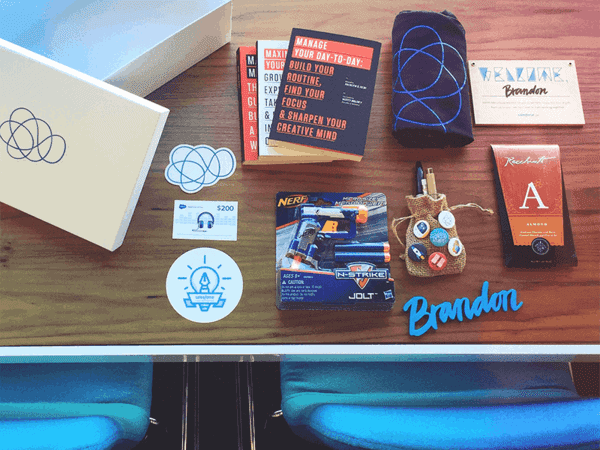
- If you typically give them a welcome kit... mail it to them so they get it in their first week (preferably, first few days).
- If you have frequent 1 on 1s for the first few weeks... do the same via video calls to check in with them and see how they're doing, potentially multiple times a week as long as they seem helpful.
- To introduce someone asynchronously... interview them on a company internal podcast like ConvertKit does for all new hires.
There is no perfect way to onboard remote employees. The main things to keep in mind are to:
- Check-in with them frequently, since you can't walk by their desk to chat or glance over to see how they seem to be doing
- Have open communication, particularly by giving them a clear place they can go to have their questions answered so they feel supported
- Find ways to include them in the work your team is doing and to meet their teammates quickly, so they feel like they're contributing and get a sense of forward momentum (give them a quick win)
If you can put processes in place that take care of each of these points, you'll have the most important pieces down and can iterate from there (especially if you're still adapting to remote work yourself).
Further reading: For more tips on how to improve your onboarding, read our guide: 4 Ways You can Improve Your Employee Onboarding Process.

14) Unexpected surprises that only remote employees can pull off
While remote work allows you to access a much bigger talent pool all across the globe, this also means that all this talent has access to more opportunities, too. And with the new technologies that allow for all this remote collaboration, it also creates problems that didn’t exist for people coming to an office every day.
One person, many jobs.
An October 2022 study led by ResumeBuilder.com on a sample of 1,250 full-time remote workers showed that a staggering 79% of them had either a full- or part-time side gig, this is a 10% increase compared to 2021.
While most of these employees working multiple remote jobs stop at two parallel roles, some take it even further, with “success stories” boasting having five high-paying, remote office jobs at the same time.
The same survey from 2022 showed that one third of remote/hybrid workers who are working an extra job actually have multiple jobs.
The pitfalls of working multiple remote jobs
There are obvious ethical and legal issues of working multiple jobs, but those aren’t the biggest issues you need to worry about as their manager. Instead, your focus is likely then on:
- Not getting what you thought. When someone has multiple jobs, they’re not working 80+ hours a week. Instead, they’re usually coasting at both, trying to do the minimum to keep both jobs. Most employees working multiple remote jobs say they don’t work at two jobs combined more than at one regular full-time job.
- Missing meetings and input. A key part of pulling off the multi-job hustle is dodging meetings, or avoiding participating in them. Scheduling conflicts and joining multiple calls at once is often their biggest challenge, and obviously takes away from their effectiveness and contributions to your team.
- Frustrated coworkers. If your multi-job team member isn't pulling their weight and contributing in discussions, it will frustrate their coworkers who are working hard and fully invested.
How to avoid having employees who have multiple jobs or catch them sooner
The best way to handle this is to avoid hiring remote employees who do this in the first place. This saves you all the headaches of managing their performance, awkward discussions, strain on your team, and eventual struggles with HR around their potential departure.
When interviewing candidates, to help avoid these kinds of hires try things like:
- Be direct and up front: Make it clear during the interview process that having multiple jobs isn’t a good fit for your team. Most people will politely decline a job if the think you’re not an easy target.
- Remember to make background checks: Speaking to past employers and checking their employment history is a good way to catch if this is something they have done before. While the references they provide are less likely to reveal if this is the case, check you and your team’s network for your own connections that might.
- Look at your employment contracts: Depending on your state and local labor laws, you may be able to put clauses in the employment agreement to protect you. If you do, let your hires know so that they can decide if they want to accept the offer. Better to avoid surprises for everyone.
…and what if they already work on your team?
Unfortunately, you may not always catch them before they join your team, or they may start adding more jobs after they start working with you.
Here’s the warning signs to look for that your team member is working multiple full time jobs. Keep in mind that any one is not a sure sign by itself, but a combination of them makes it much more likely:
- Not updating their Linkedin. If your team member avoids updating their Linkedin despite working at your company for months, it’s worth asking them about. If they don’t have a profile at all, it doesn’t mean they have multiple jobs, but is worth checking for more signs.
- Hard to reach. How responsive is your team member? Are they consistent in when and how they respond? Can you reach them quickly in an emergency? If those are all issues, that’s a strong sign.
- Missing or not present at meetings. People working multiple jobs have a hard time making meetings even if their calendar shows them available. They may also have to be on two calls at once which means they’ll turn their camera off and try to avoid speaking or participating unless they have to.
- Changes in work quality and missed deadlines. While there are many reasons for a drop in work quality and timeliness, it is worth investigating if it’s persistent and especially if it comes together with another sign of working multiple jobs.

What to do if you suspect your team member holds multiple jobs
If you're seeing multiple signs that you may have a remote team member who is trying to work multiple full time jobs, it's best to tackle it head on.
As it can be a sensitive subject, and there's a chance you're wrong, it's best to discuss it during a one on one meeting with them. This gives you plenty of time to go over your concerns, what you've observed, and to hear their side of the story.
In many cases, they will admit to it directly, or their excuses and body language will tell you all you need to know. From there, consult your HR department and boss to determine the best path forward, or work with them on a performance improvement plan that will clearly bring change to the issues you have.
You can learn more about how to set expectations for an employee who is holding multiple jobs in this article about turning around disengaged and underperforming employees.

More remote work resources to help you thrive as a remote leader
There are a lot of potential positives that can come from hiring remote employees. Those include pulling from a larger talent pool to increased retention and productivity from those working remotely.
More importantly, the world is moving in the direction of remote work becoming the norm, especially post-COVID lockdowns.
The sooner you learn what it's like to hire and manage remote employees, the sooner you'll understand how the team of the future is likely to function– and how to be a better manager as a result.
Andreas Klinger put it best in his remote crash course: when it comes down to it, "the best-practices of remote teams are often learnings for all digital knowledge work teams.”
If working with remote hires forces you to become more intentional, thoughtful, and systematized, that's only going to make your entire team better.
Want to learn more? Here's some great further reading on best practices for hiring remotely:
Managing your remote employees:
- Find out what remote work will entail in 2023 and how you as a manager can prepare your team and yourself: Changes Affecting How We Work Remotely In 2022 + How To Prepare Your Team
- You shared your biggest challenges with hybrid work and we answered them in our “Ask Lighthouse” series Hybrid Teams, Productivity, Managing Generations: Answers To Your Biggest Workplace Challenges
- The unfortunate truth is that you may need to do layoffs remotely. Learn how to do it right, unlike some of the big companies in the news: How to Do Layoffs (Even If You Have to Do them Remotely)
Common pitfalls and mistakes to avoid:
- Managing remotely is different from managing when you're in an office together. These are the most common mistakes we've found: 5 Common Mistakes Managers Make with Remote Workers
- Partially remote (aka - hybrid teams) is a lot different from fully remote or distributed teams. Here are The 5 Major Pitfalls of Managing a Partially Remote Team you need to avoid.
Being a great leader and manager to your remote employees:
- Building rapport with remote team members is harder than when you're face to face. Here's what to do about it: How to Build Rapport with Your Remote Team Members
- Ask these questions to better manage your remote employees: 31 Questions to Ask Remote Employees to Better Support Them
- Want to nail the fundamentals of managing remote team members? Read our most popular post on the subject: 11 Essential Tips for Managing Remote Employees
- If you have a hybrid team, manage the challenges by asking: Remote Management: 41 Questions to Ask Your Hybrid Team
- And in response to our tips on remote work, Hacker News has some interesting comments and suggestions here.
Are you growing as a leader? Are you building the skills you need?
Whether your team is in office with you or remote, Lighthouse Lessons can teach you the skills you need to better lead, motivate, and grow your team. Let us help you navigate the unique challenges of being a leader like we helped Daniel by learning more and signing up here.